Autumn Leaves Patterns: A Practical Guide to Integrating Seasonal Assets into Your Creative Workflow
In the realm of digital design and content creation, seasonal assets often serve as more than just decorative elements; they are functional tools that can elevate a project's narrative and visual appeal. Autumn Leaves Patterns represent a specific category of vector and raster graphics designed to capture the essence of the fall season through vibrant colors and organic shapes. For professionals ranging from graphic designers and marketers to small business owners and educators, understanding how to effectively utilize these patterns is crucial for maintaining a cohesive brand identity during the autumn months.
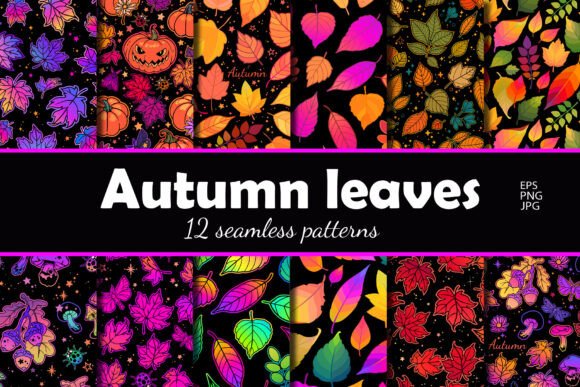
This collection is not merely a set of images but a comprehensive toolkit comprising 12 unique seamless square patterns. The versatility of this set lies in its technical specifications and adaptability across various platforms. Whether you are preparing marketing materials for a local coffee shop, designing educational resources for schools, or creating digital scrapbooking layouts, having high-quality, scalable assets at your disposal streamlines the production process significantly.
The Technical Foundation: Understanding What You Get
To integrate these assets efficiently into your workflow, it is essential to first understand the deliverables included in the package. The set provides 12 distinct seamless square patterns, each meticulously crafted to ensure continuity when tiled. The inclusion of multiple file formats and resolutions addresses the diverse needs of modern digital ecosystems.
- EPS 10 Files: These vector files are the backbone of professional design work. They allow for infinite scalability without any loss of quality. If you are working on large-format printing projects like banners, posters, or packaging, the EPS format ensures that the intricate details of the leaf veins and color gradients remain crisp regardless of the output size.
- JPG and PNG (3000x3000 pixels): This resolution strikes an ideal balance between high fidelity and manageable file size. It is perfect for web applications, social media posts, and email newsletters where loading speed matters but image clarity cannot be compromised. The transparent background option in PNG files offers flexibility for layering over different backgrounds.
- JPG and PNG (4000x6000 pixels): Designed for high-resolution displays and print-on-demand products, this larger dimension provides exceptional detail. This is particularly useful for merchandise such as t-shirts, tote bags, or canvas prints where the pattern needs to cover a significant surface area without pixelation.
The variety in resolution means you do not need to rely on third-party upscaling software, which often degrades image quality. Instead, you can select the appropriate asset based on the specific requirements of your current task, ensuring optimal performance and visual consistency.
Strategic Integration Across Different Workflows
The true value of Autumn Leaves Patterns emerges when they are strategically placed within broader creative and business processes. These patterns are not isolated elements; they interact with other tools and methodologies to enhance the final output.
Pre-Production Planning and Brand Consistency
Before a single pixel is edited or a layout is finalized, planning is key. For marketers and brand managers, the autumn season requires a shift in visual language. Incorporating these patterns early in the planning phase allows teams to establish a consistent aesthetic across all channels. By selecting one or two patterns that align with your brand palette, you create a thematic anchor for the quarter.
For example, a small business owner launching a holiday product line can use these seamless patterns as background textures for their e-commerce website. Because the patterns are seamless, they can be applied to sidebars, headers, or footer sections without visible breaks, creating a polished and immersive user experience. This preparation phase reduces the time spent searching for suitable imagery later in the cycle.
Execution in Design and Content Creation
During the execution phase, the choice of file format dictates the toolset you will use. When working in Adobe Illustrator or CorelDRAW, importing the EPS 10 files allows for non-destructive editing. You can recolor the leaves to match specific corporate guidelines or adjust the opacity to create subtle overlays that do not overpower the primary text or imagery.
In contrast, when using photo editing software like Photoshop or Canva for rapid content creation, the PNG and JPG files are more efficient. The 3000x3000 pixel versions are excellent for creating Instagram stories or Facebook covers, while the 4000x6000 pixel versions are ideal for high-definition YouTube thumbnails or blog feature images. The ability to switch between vector and raster formats seamlessly ensures that your workflow remains uninterrupted regardless of the medium.
Post-Production and Asset Management
Once the designs are complete, organization becomes critical for long-term efficiency. The 12 variations provide enough diversity to prevent visual fatigue in your audience. However, managing these assets requires a structured approach. Categorize the files by resolution and intended use immediately upon download. Create a folder structure such as "Print_Designs" for the EPS and high-res PNGs, and "Web_Assets" for the standard resolution files.
This organizational step pays dividends during future projects. If you are running a recurring campaign every autumn, having a pre-sorted library of these patterns means you can reuse them with minimal adjustments, saving valuable time and ensuring brand consistency year after year.
Practical Implementation Tips and Best Practices
To get the most out of this collection, consider the following practical strategies that focus on usability, compatibility, and quality control.
Maintain Visual Hierarchy: While the colorful nature of autumn leaves is attractive, it can easily become distracting if overused. Use the patterns as background elements or borders rather than the focal point. Ensure there is sufficient contrast between the pattern and any text overlaid on top. Using the transparency features in PNG files can help blend the pattern naturally with the underlying content.
Optimize for Performance: Even though high-resolution images look great, they can slow down websites if not optimized. Before uploading the 4000x6000 pixel files to a server, compress them using tools like TinyPNG or ImageOptim. This reduces the file size without noticeable loss in quality, improving page load times and SEO rankings. Remember that Google favors fast-loading pages, and a cluttered site with heavy assets can negatively impact user engagement.
Leverage Vector Scalability: One of the strongest advantages of the EPS 10 format is its scalability. Do not limit yourself to standard screen sizes. You can take a single pattern and scale it up for a trade show booth display or down for a business card stamp. This flexibility maximizes the return on investment for your purchase, allowing you to use the same asset across both digital and physical mediums.
Collaboration and Cross-Platform Compatibility
In many professional environments, design assets must move between different team members and software platforms. The Autumn Leaves Patterns set is built with cross-compatibility in mind. The standard file formats (JPG, PNG, EPS) are universally supported by almost all design, presentation, and publishing software.
When collaborating with freelancers or external agencies, sharing the EPS files ensures that the recipient can edit the colors and shapes if necessary. Conversely, sharing the JPG or PNG files prevents accidental modifications to the original artwork. This distinction is vital for maintaining version control and preventing errors in the final delivery.
For educators and bloggers, these patterns offer a quick way to refresh course materials or blog posts. You can insert a seamless pattern into a slide deck background or use it as a divider in a newsletter. The variety of 12 patterns allows for rotation, ensuring that your content does not appear repetitive to your regular readers or students.
Ensuring Quality and Long-Term Value
Quality control is a fundamental aspect of professional work. When integrating these patterns, always check the seams. Although they are described as seamless, viewing them at 100% zoom on a white background before applying them to a project helps verify that the tiling is correct. This simple step prevents awkward breaks in the design that could detract from the overall professionalism of the piece.
Furthermore, consider the longevity of the asset. Autumn themes are cyclical, but good design transcends seasons. By choosing patterns with balanced color palettes and timeless leaf motifs, you ensure that the assets remain relevant even beyond the immediate harvest season. This forward-thinking approach to asset selection supports sustainable creative practices and reduces the need for constant new purchases.
In conclusion, Autumn Leaves Patterns offer a robust solution for anyone looking to enhance their visual communication during the fall season. By understanding the technical specifications, planning their integration into your workflow, and adhering to best practices for optimization and organization, you can leverage these assets to produce high-quality, engaging content. Whether you are a seasoned designer or a hobbyist exploring creative expression, this set provides the foundation for successful implementation across a wide array of projects.